



- The Non-Deterministic Reality
- Spec-First, Then Build
- Code Is Cheap: The Throw-Away Mindset
- Quality Gates: Built-In Self-Correction
- Skills: Build Once, Reuse
- Worktrees: One Branch, One Environment
- Parallel Agents: Do More at Once
- Vibe User: Let the Agent Be the User
- Half of This Is Not Coding
- What This Adds Up To
What does it actually look like to work with AI every day as an engineer?
In this piece, Human Made Senior Engineer Ivan Kristianto shares a practical, battle-tested workflow for building with AI agents. From spec-first thinking and parallel execution to disposable code and “vibe user” testing, this is a candid look at what works, what breaks, and how to stay effective as the tooling evolves almost daily.
I use AI agents every day: not just to write code, but for research, brainstorming, planning, and user testing. This post is not a tool recommendation. It is a set of patterns I have found effective: staying tool-agnostic, working spec-first, building skills, isolating work in worktrees, spawning agents in parallel, and using AI away from the keyboard. The goal is to show what a real AI-augmented workflow looks like, trade-offs and constraints intact.
The Non-Deterministic Reality
The first thing to accept about AI is that it is non-deterministic. Run the same prompt twice and you get two different results. This is not a bug to work around. It is the nature of the medium, and once you accept it, everything else about how to use these tools becomes clearer.

Because output varies, I do not commit to one tool or one model. I move freely between Claude Code, Gemini CLI, Copilot CLI, Codex CLI, Codex App, OpenCode, and Anti Gravity, picking whatever fits the task or the moment. The landscape changes fast; most mornings there is a new model or a new release to try. Locking yourself to a single tool means constantly leaving capability on the table.
Spec-First, Then Build
Before writing any code, I spend time on the spec. This single practice separates productive AI usage from frustrating AI usage.
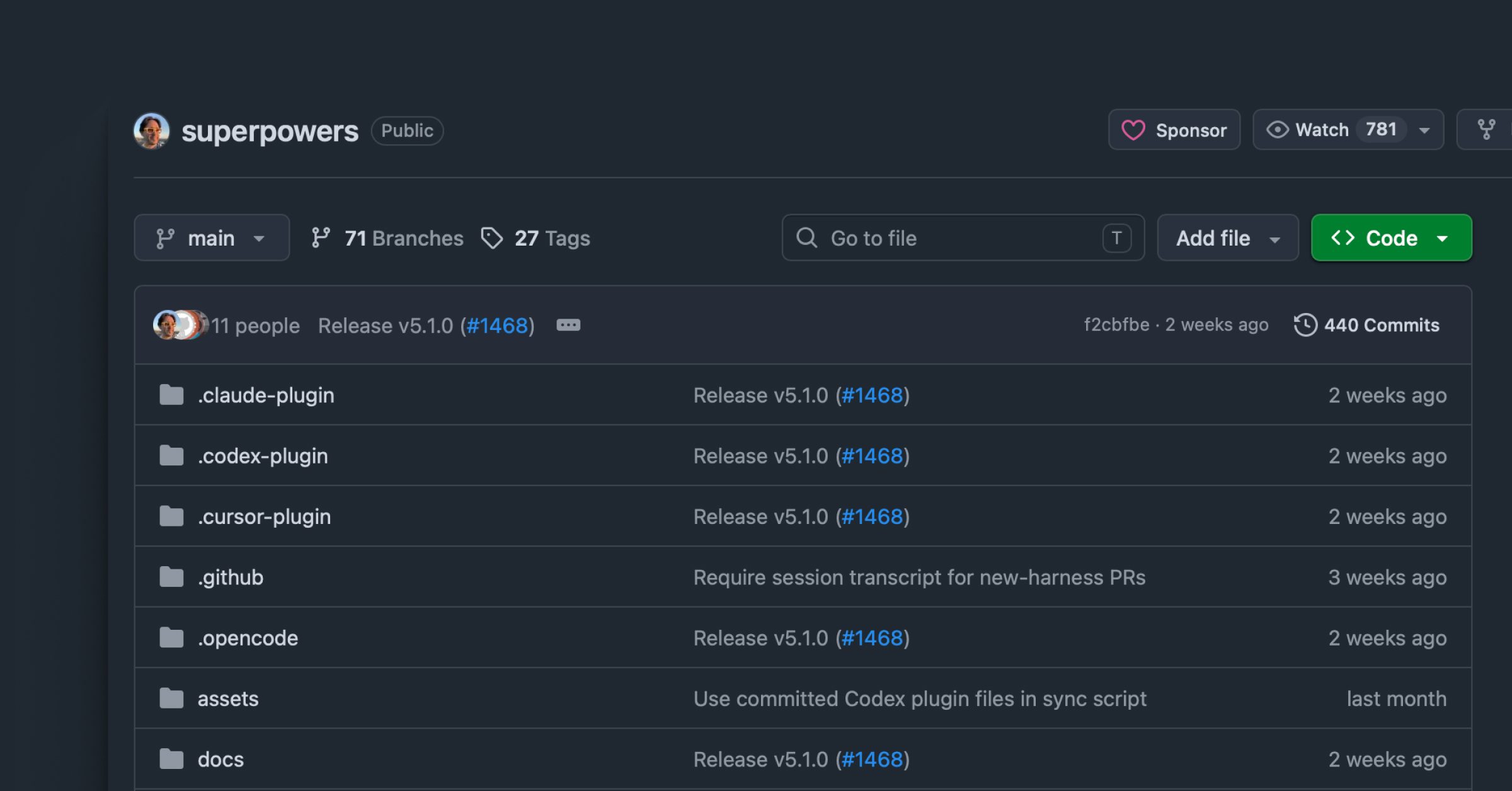
My framework is obra/superpowers, which implements a seven-stage development process: brainstorming, worktree setup, plan writing, subagent-driven development, test-driven development, code review, and finishing. I do not follow every stage mechanically, but the core sequence, brainstorm, spec, plan, build, review, is the backbone of how I work.
Step 1: Create the Worktree
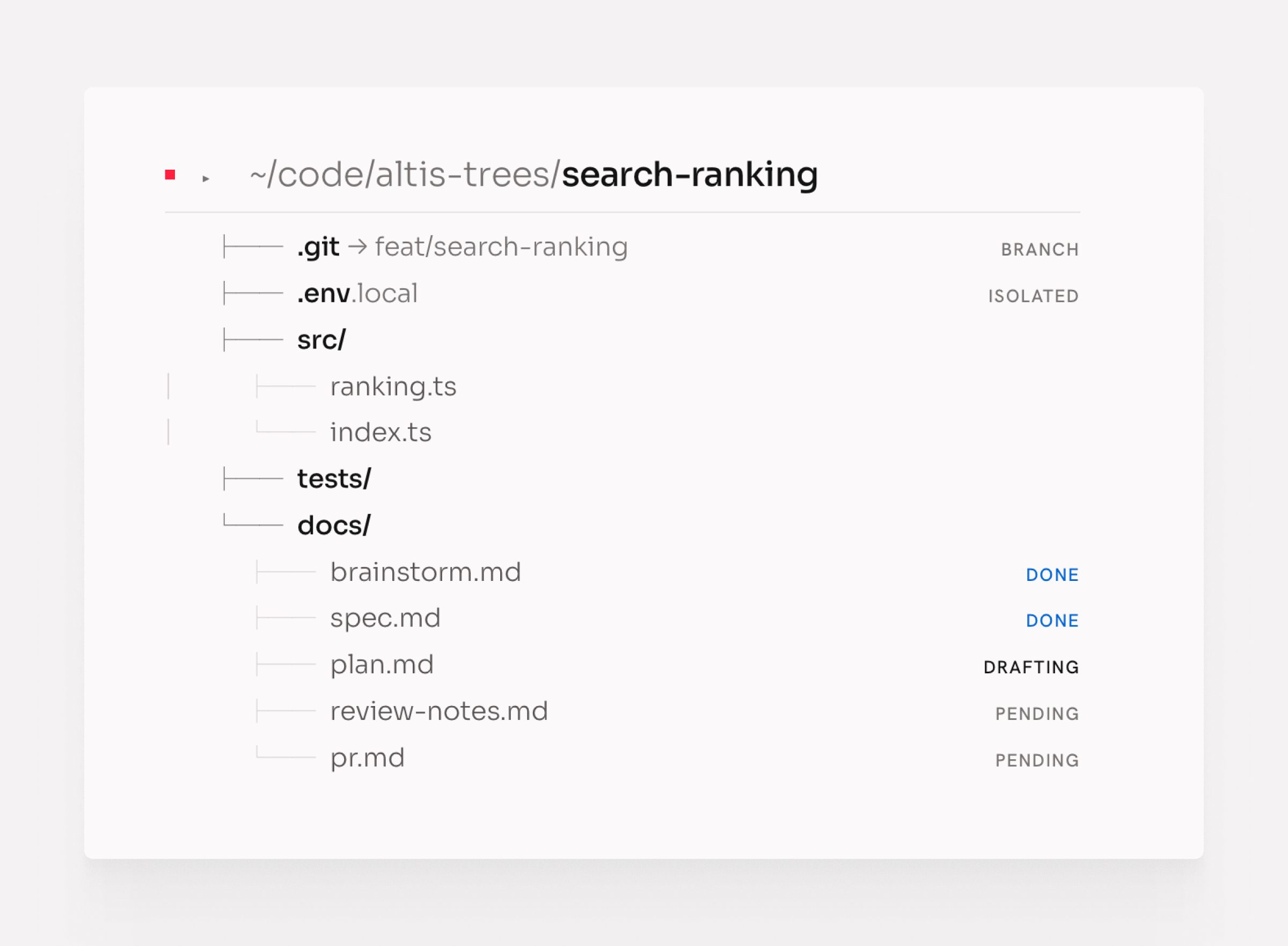
Every piece of work starts with its own Git worktree. A personal skill creates worktrees in an opinionated, consistent way: the right branch name, the right directory structure, the right environment. One command, and the workspace is ready.
This matters because everything that follows happens in isolation. The worktree is the container for the entire feature, from first brainstorm to merged PR.
Step 2: Brainstorm With the Agent
With the worktree ready, I open a brainstorming session using the superpowers brainstorming skill. The agent interviews me, asks questions to understand the problem, explores different approaches, and sometimes visualizes options: diagrams, flow descriptions, comparisons. It does not start designing until it understands what I actually want.
This step is slower than typing “build X.” It is also why the output is worth building.
Step 3: Write and Review the Spec
Once the agent has enough context, it writes the design spec. I read it carefully and improve it where my thinking has evolved. Then I bring in a second agent: I share my vision for the feature and ask whether the spec aligns with that vision. A fresh agent without prior context finds gaps I glossed over.

The spec is the source of truth for everything that follows. Getting it right here prevents rewrites later.
Step 4: Build the Implementation Plan
With a solid spec, I ask the agent to write an implementation plan. Superpowers breaks this into small tasks: each two to five minutes of work, with exact file paths, complete code intent, and verification steps.
I read the plan thoroughly. When I find gaps or steps that do not match my intent, I tell the agent to change them. A vague step in the plan produces vague code. I fix the plan until every step is something I would hand to a junior developer with no further explanation.
Step 5: Cross-Review Spec Against Plan
Before building starts, I spawn a fresh agent and ask it to review the spec and the implementation plan side by side. Does the plan deliver what the spec describes? Does every acceptance criterion in the ticket have a corresponding step in the plan?
This agent reports gaps. I fix them. Then building can start.
Step 6: Execute the Plan
When the plan is solid, I run the executing-plans skill. This dispatches subagents that execute each task sequentially, running checks between steps and stopping if something goes wrong.
I use a detailed prompt for this step to give the agent the right context and constraints:
/superpowers:executing-plans
docs/plans/path-to-implementation-plan.md

Follow the plan strictly and complete tasks sequentially and do not stop until finish.

Execution Rules

1. Implement tasks one by one in the order defined in the plan.
2. Create a separate commit for each completed task.

Code Review Phase
3. When all tasks are completed:
- run the requesting-code-review skill
- review the code changes against the implementation plan
- fix any valid feedback or implementation gaps.

Finalization
4. Run all tests and quality gates again.
5. If everything passes:
- commit final changes
- push the branch

Output
6. Provide a concise summary including:
- tasks completed
- commits created
- issues fixed during reviews
- manual test results
- test and quality gate results
- link to the created PR.
I start it and leave. The agents work through the plan without me.
Step 7: Review as a User
When execution finishes, I review the result as a user, not as an engineer. I do not read the code at this stage. I use the feature. I look for whether it does what I asked, not whether the implementation is elegant.

If the result is significantly wrong or too much is missing, I reset. I discard the code and return to the plan: refine it, try a different model, or rethink the spec. Starting over is faster than patching something fundamentally off.
If the result is mostly right with some gaps, I continue.
Step 8: Code Review by Three Agents
For the code review, I spawn three subagents in parallel, each focused on a different angle:
- Maintainability: is the code readable, consistent, and easy to change?
- Performance: are there obvious bottlenecks or inefficiencies?
- Security: are there vulnerabilities, unsafe inputs, or exposed data?
Each agent reviews independently. When the results come back, I triage them: critical issues get fixed immediately, lower-priority findings get addressed or noted. Then I ask the agent to implement the fixes.
This cycle repeats until the code meets the bar.
Step 9: Ship to PR and Test
When the code passes review, I open a pull request and do a final manual review of the diff. Then I create a test plan as a user: a checklist of scenarios a real user would walk through.
I give that test plan to an agent with browser access and ask it to execute each step using the Chrome integration. The agent runs through the plan, reports what passes and what fails, and I address the failures.
This cycle, fix, retest, fix again, continues until the feature works end to end as a user would experience it.
When it does, I merge.
Code Is Cheap: The Throw-Away Mindset
I treat generated code as disposable by default.
The agent builds. I review. If the result falls short, I throw it away and start again: with a different model, a different prompt, or a refined implementation plan. This sounds wasteful. In practice it saves more time than it costs. Iterating on code going in the wrong direction is expensive. A clean start with a better spec is cheap.
Code is cheap now. The expensive part is reading, deciding, and knowing when to stop.
This mindset only works if you are honest during review. The temptation is to keep patching something that is mostly right. Resist it. If you would not write it yourself, and the agent cannot fix it cleanly in one more pass, throw it away.
Quality Gates: Built-In Self-Correction
The single biggest improvement to agent output quality is not a better prompt or a smarter model. It is a strict set of quality gates that run before every commit.
Agents still hallucinate (a lot). They produce code that looks right but breaks something subtle. Quality gates change that: the agent catches its own mistakes without you having to notice them. The gates fail, the agent reads the error, fixes it, and tries again. By the time you see the output, it has already corrected itself.
The Gates I Run
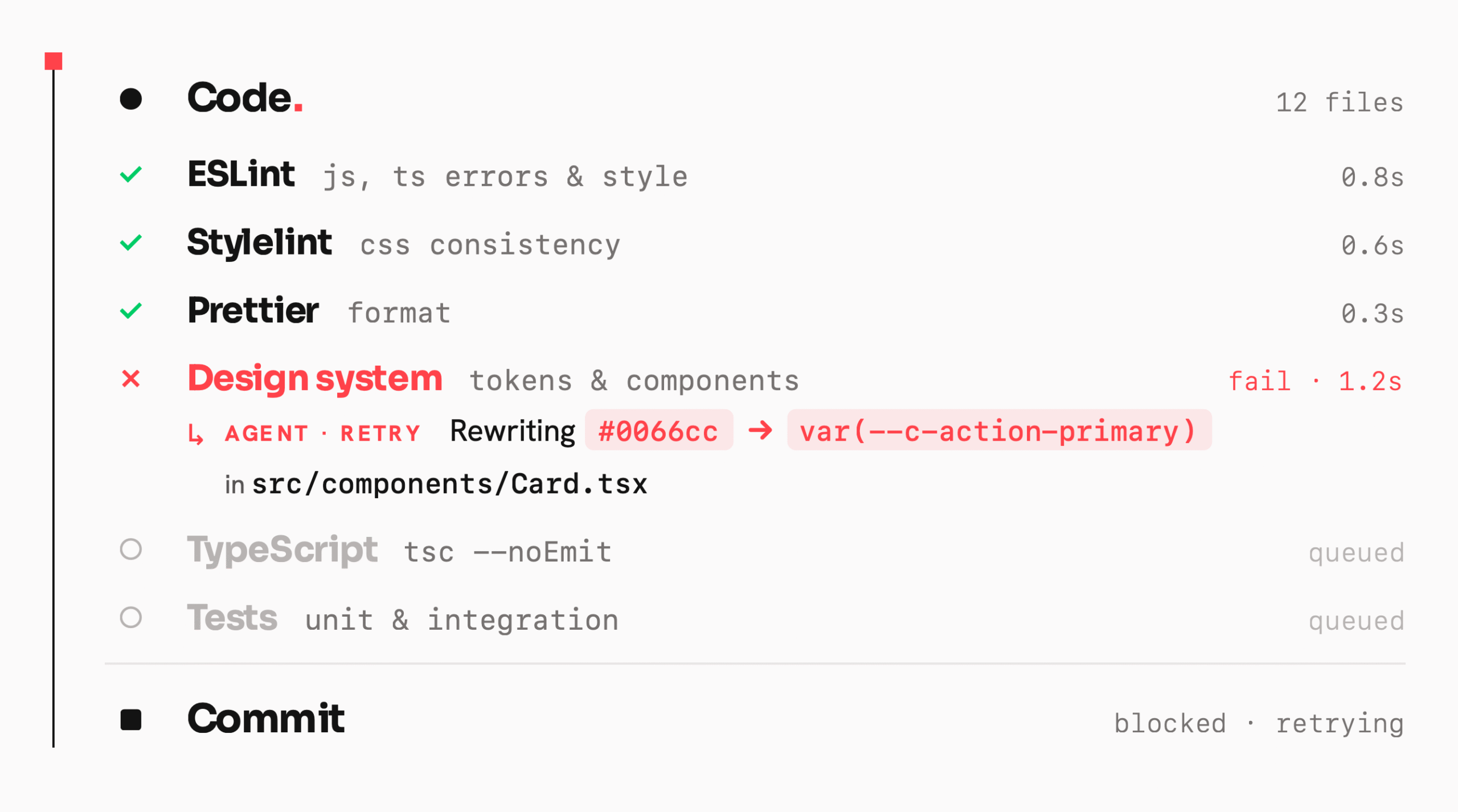
I enforce six checks on every project:
- ESLint catches JavaScript and TypeScript errors, enforces code style rules, and flags patterns that cause bugs. The agent cannot commit code that fails this.
- Stylelint enforces CSS and SCSS consistency. Without this, agents drift into inconsistent naming, specificity problems, and unmaintainable styles.
- Prettier formats all code uniformly. It removes every formatting argument and keeps diffs clean.
- Design system compliance is a custom check that verifies the agent is using the correct design tokens, components, and patterns rather than inventing its own. This gate most often catches an agent going off-script.
- TypeScript typecheck runs
tsc --noEmitto catch type errors that ESLint misses. Agents frequently produce type-unsafe code that passes linting but breaks at runtime. - Unit and integration tests run on every commit. If the agent breaks something that was working, the tests catch it immediately rather than at review time.
Why This Works
Each gate provides fast feedback. The agent does not wait for a human review to learn it got something wrong; it gets an immediate, machine-readable description of exactly what needs to change. It reads the error, fixes it, and commits.
This loop, write, check, fix, commit, runs automatically inside the executing-plans skill on every task. By the time the skill finishes, the code has passed all six gates on every commit in the plan.
The code quality you get back is substantially higher than what agents produce without gates, not because the agent got smarter, but because it corrected itself dozens of times before you saw the result.
Skills: Build Once, Reuse
A skill is a reusable prompt or workflow: a precise set of instructions for doing a specific thing well, invocable with a single command. Skills eliminate the overhead of re-explaining context every time.
Finding Skills
Before building a skill, I search for one that already exists. I use skills.sh, a tool that searches available skill libraries and surfaces what fits the task. Most of the time, someone has already built what I need.
When I find a candidate, I read it carefully before downloading. A skill that looks useful can encode assumptions that conflict with how I work, or instructions I would not want an agent following automatically. Reading it first costs a minute; discovering the problem mid-task costs far more.
If the skill works, it earns a permanent place in my toolkit. If it does not, I delete it and move on. No friction, no sunk-cost trap.
Building Custom Skills
For tasks I repeat often and cannot find a skill for, I build one. The process is straightforward: describe what I want to achieve, have the AI draft it, read it carefully, refine it, and test it. Once built, I run it, step away, and come back to the result.
The fire-and-forget pattern works because the skill captures the reasoning once. I do not re-explain the standard every time; I invoke it.
I build new skills whenever I find myself writing the same instructions more than twice. That threshold is the signal.
Skills I Use
These are the skills currently in my toolkit across ~/.claude/skills and ~/.agents/skills:
| Skill | What it does |
|---|---|
worktree-environment-setup | Creates a Git worktree in an opinionated, consistent way: branch name, directory structure, environment |
multi-reviewer-code-review | Spawns three subagents in parallel to review code for maintainability, performance, and security |
generate-test-plan | Produces a user-facing test plan from git changes |
execute-test-plan | Runs a test plan using Chrome browser automation, step by step |
triaging-issues | Triages GitHub issues before implementation: classifies, asks clarifying questions, identifies scope |
github-issue-creation | Turns a rough idea or bug description into a well-formed GitHub issue |
agent-browser | Browser automation for agents: navigating pages, filling forms, extracting data |
writing-clearly-and-concisely | Applies Strunk’s rules to any prose I write or edit |
reflect | After a session, extracts learnings and patterns worth keeping |
skill-creator | Builds, tests, and improves skills, including benchmarking and eval runs |
frontend-design | Generates production-grade frontend components with high design quality |
gemini | Runs Gemini CLI for code analysis, refactoring, or automated editing |
codex | Runs Codex CLI for the same |
lfg | Full autonomous engineering workflow, end to end |
debug-optimize-lcp | Debugs and optimises Largest Contentful Paint using Chrome DevTools |
seo-audit | Audits a site for technical SEO issues |
Worktrees: One Branch, One Environment
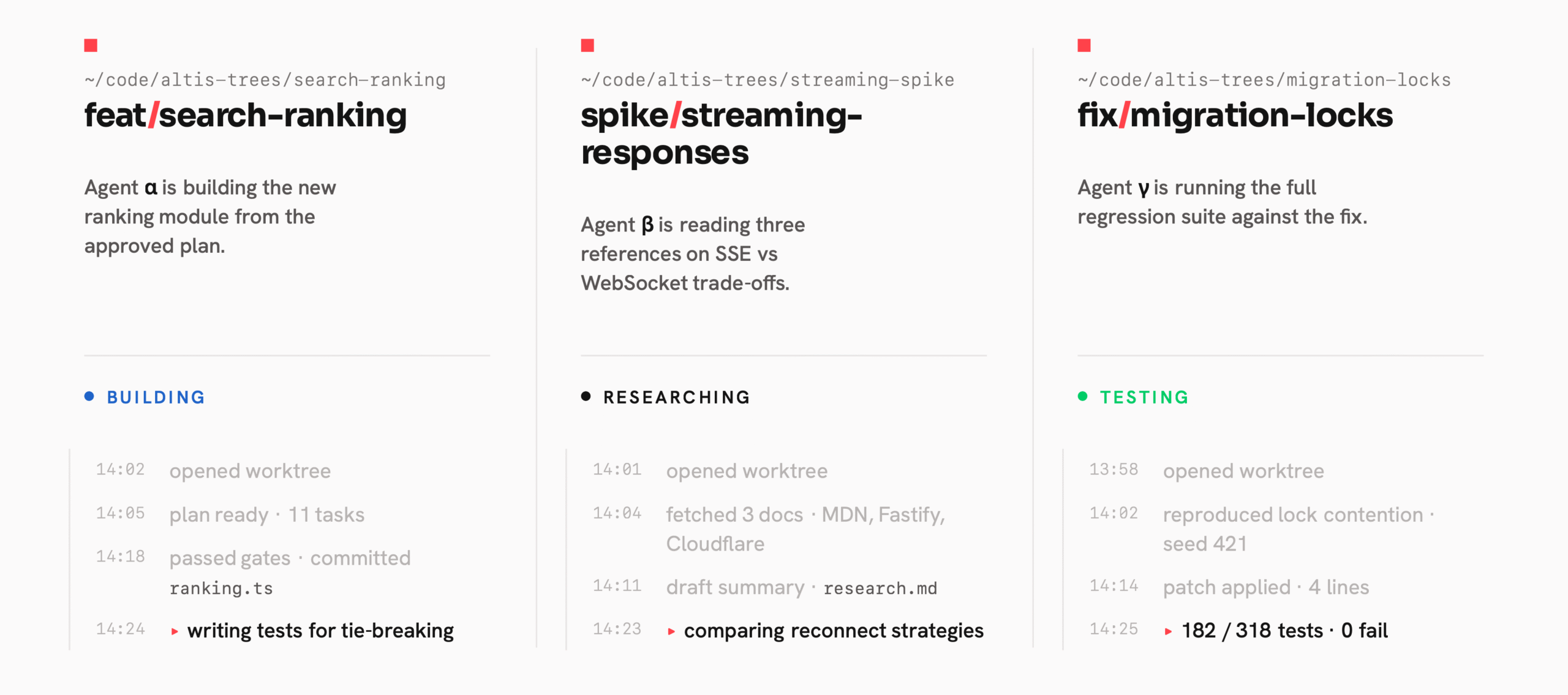
I use Git worktrees heavily. The rule is simple: one branch of work equals one worktree.
This lets me run multiple repos and multiple workstreams at the same time without context switching. I use supacode.sh daily, which makes managing multiple worktrees across multiple repos workable. Each worktree is isolated: its own environment, its own agent session, its own state.
The practical effect is that I can run three or four things in parallel without losing track of any of them. One agent is building a feature. Another is doing research. A third is running tests. I move between them when there is something to review, not before.
Parallel Agents: Do More at Once
Whenever tasks are independent, I spawn multiple agents or subagents in parallel. This is one of the most direct ways to save time.
Instead of running three research tasks in sequence and waiting for each one, I fire all three at once. When they are done, I read the results. The same logic applies to code generation, code review, brainstorming, and exploratory analysis. If the work does not depend on other work completing first, it should run in parallel.
This requires a slight shift in how you think about task planning. Before starting, I ask: which parts of this depend on each other, and which parts are independent? The independent parts go in parallel. It takes practice but becomes instinctive quickly.
Vibe User: Let the Agent Be the User
One technique that most developers miss: ask the agent to use the app as a normal user would.
I call this “Vibe User.” Rather than always using agents to build or review code, I give them browser access, via Chrome DevTools MCP, agent-browser, or the Claude Chrome integration, and tell them to explore the app as a real user with no prior knowledge. The agent navigates, finds friction, forms opinions, and returns ideas, suggestions, and critiques.
This is valuable precisely because I built the thing and know too much. I know where to click, what each error means, where the sharp edges are. A user does not. The agent-as-user surfaces problems I would not notice because I am too close to the code.
Vibe User works well for UX review, early-stage product testing, and any time you need a fresh perspective on something you built. It complements Vibe Coding rather than replacing it.
This is an example of the prompt I use to do UX research on a web app:
You are a Senior Product Designer with 15+ years of experience shipping consumer and B2C products at companies known for design excellence.
Your expertise includes interaction design, information architecture, usability, and design systems.

Role
Act as my design partner and perform a usability and product design review of the application.

Target App
http://YourURL.local/

Method
Use the Chrome DevTools (or Agent Browser) skill to:
1. Open the application.
2. Log in using the provided demo credentials.
3. Explore the product as different user roles.
4. Visit all accessible pages and test core features and workflows.

Demo Credentials

Admin
Email: demo@example.com
Password: demo123456789

Review Framework

For each page you visit, document:

Page
- Page name / route

Observation
- What the page does
- Key UI components and interactions

Critique
- Usability issues
- Interaction friction
- Information architecture problems
- Design system inconsistencies
- UX clarity or affordance issues

Improvement Suggestions
- Specific design improvements
- Interaction changes
- IA or layout changes
- Component-level recommendations

Final Output

After reviewing the entire application:

1. Summarize the overall UX quality of the product.
2. Identify recurring design problems or patterns.
3. Provide the **Top 3 highest-impact improvements** that would most improve usability or product clarity.
4. For each improvement include:
   - Problem
   - Proposed solution
   - Expected impact.
Half of This Is Not Coding
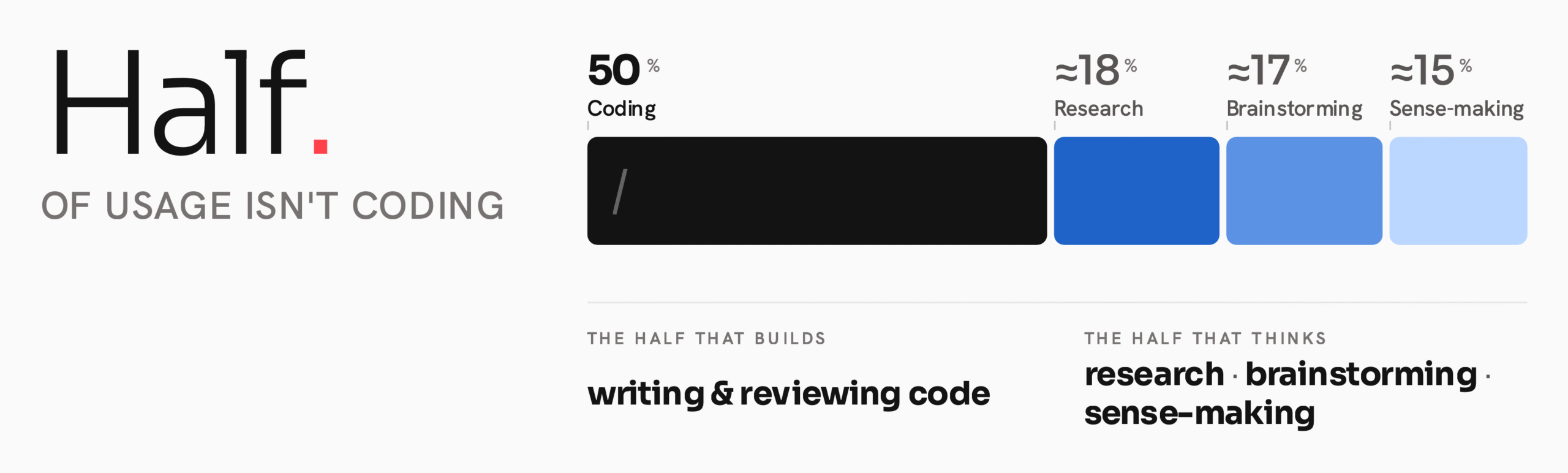
If I add up where my AI usage actually goes, roughly half is not coding at all. It is research, brainstorming, and making sense of information. Agents are as useful for thinking as they are for building, sometimes more so.
On Mobile: Fire and Forget
I use Gemini, Claude, and ChatGPT from my phone throughout the day. When an idea surfaces, on a walk, between meetings, late at night, I open a new thread, ask a question using a skill, gem, or custom GPT, and leave it. I come back when it is ready.
This works because of skills. A good skill means I do not re-explain the context or the standard I am working to. I invoke it, set it running, and move on. Ideas get explored the moment they arise, not when I next find time at a desk.
NotebookLM: Making Sense of Messy Sources
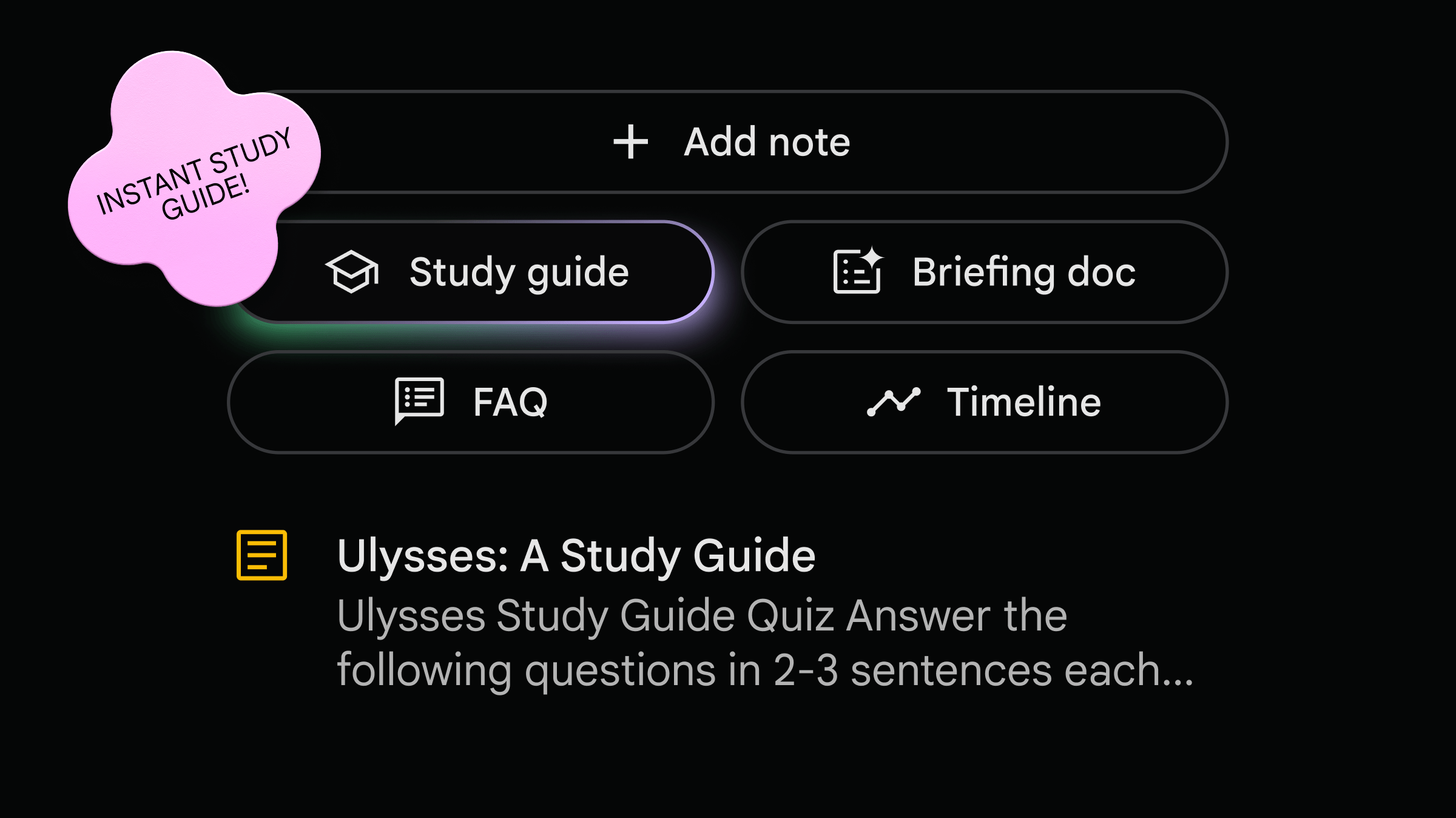
For client-facing and sales work, I use Google NotebookLM. The problem it solves is: I have an RFP, a set of Slack notes, a GitHub thread, a Fathom call transcript, and a slide deck, and I need to understand all of it quickly enough to respond well.
I put everything into NotebookLM. Then I ask questions, request summaries, and build mind maps until I have a clear picture of what the client needs. It replaces hours of reading and cross-referencing with a focused conversation.
Two things make NotebookLM useful for this work. First, it hallucinates less than most tools. Second, it cites its sources. Every claim traces back to the document it came from. When I am preparing for a client call, I need to trust what the tool tells me; source citations make that possible.
The Pattern
The pattern is the same across all of it: define the question, send the agent, move on. Come back to the answer.
The agents run while I am doing something else. The work does not wait for my attention. That is the point.
What This Adds Up To
AI agents do not replace thinking. They compress the time between an idea and a result, but only if you show up with clear intent.
The patterns in this post each solve a specific problem. Staying tool-agnostic means no single model’s bad day blocks your progress. Spec-first work means the agent builds what you actually wanted. The throw-away mindset means bad output costs almost nothing. Skills mean repeated work gets faster over time. Worktrees mean you can run many streams without losing track. Parallel agents mean independent work does not wait in a queue. Vibe User means you get honest feedback on what you built.
Together these let you handle more work with less friction. That is the practical part.
What I Had to Unlearn
The harder lesson was emotional.
Early on, I put emotion into my prompts. When the agent produced wrong output, I grew frustrated. When it hallucinated, I pushed back as if it had made a choice. When it kept apologising for the same mistake, I got angry. None of that helped. The agent has no feelings, does not remember being scolded, and frustration in a prompt produces worse output, not better.
I no longer put emotion into how I work with agents. When something goes wrong, I stop, create new session and ask a clear, direct question: what specifically is wrong, and what should change? One precise instruction produces better results than a paragraph of exasperated corrections.
When I genuinely do not know what to do, when I am stuck or the problem is beyond what I understand, I stop guessing and ask the agent to research it. I ask it to return options and reasoning, not an answer. Reading those options helps me think. Then I choose what to do next.
When the output is bad, I throw it away. No negotiating, no patching, no sunk cost. Throw it away, adjust the spec or the model or the approach, and start again. Repeat until it is right.
The Mindset That Stays
The tools will keep changing: new models, new interfaces, new integrations, every week. The underlying approach does not:
- Clear specs before building
- Disposable code, not sacred code
- Fire-and-forget, not babysitting
- Parallel everything that can run in parallel
- No emotion, just precision
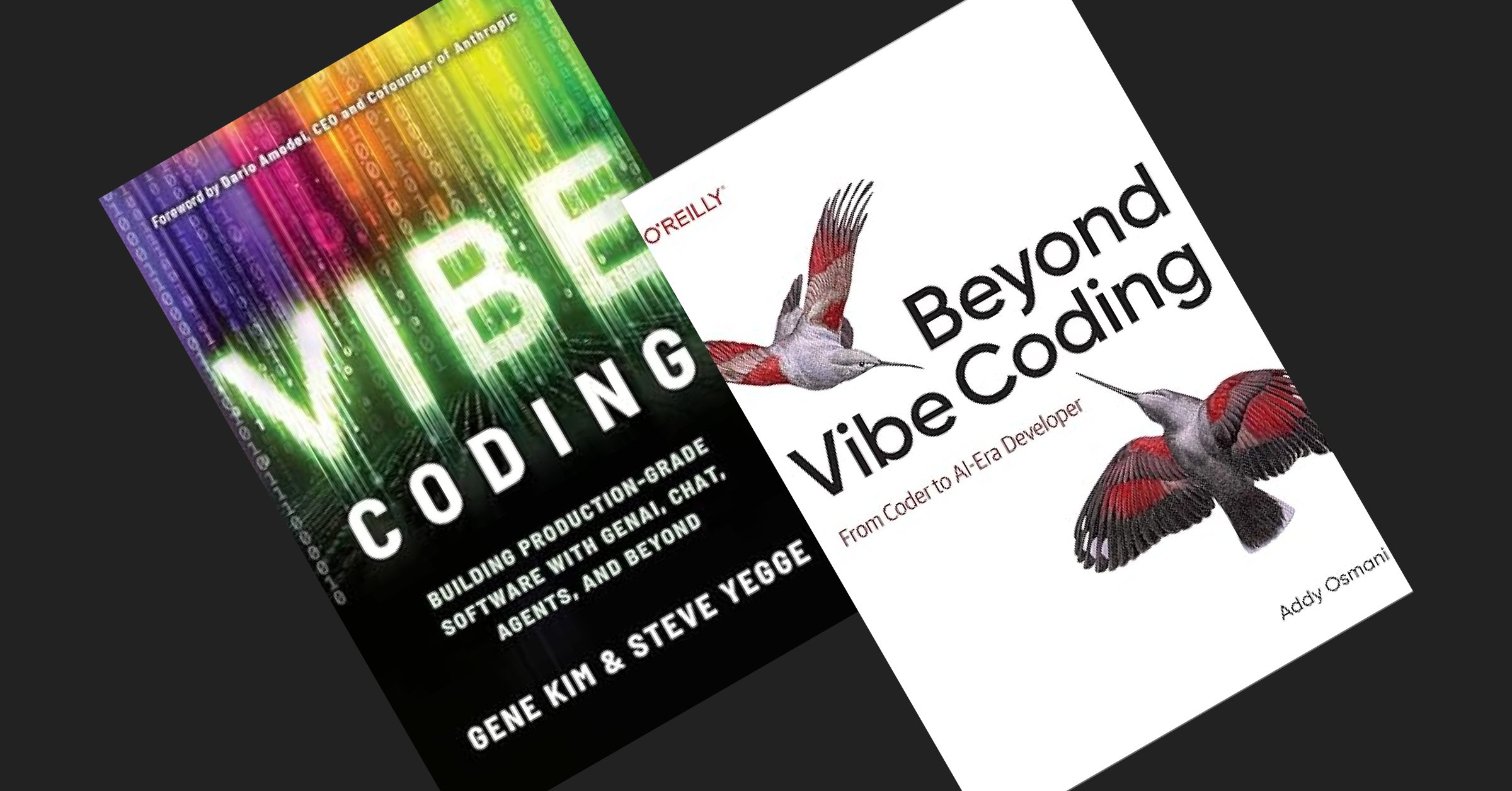
This is what I learnt from reading 2 books about vibe codings (Vibe Coding by Gene Kim & Steve Yege, and Beyond Vibe Coding by Addy Osmani), and experience it myself for the last 3 months.
There are still much to explore, but I have to pick and choose what works for me and improve my flow better.
PS: I brain dumped all my thoughts for this article into Claude Cowork and Claude Code. This article has been through many cycles of review by myself before publishing.